This article or chapter is incomplete and its contents need further attention.
Some information may be missing or may be wrong, spelling and grammar may have to be improved, use your judgment!
<!DOCTYPE html PUBLIC "-//W3C//DTD HTML 4.01 Transitional//EN"><html><head><title>SimpleHTMLPage</title><metahttp-equiv="Content-Type"content="text/html;charset=utf-8"></head><body><h1>SimpleHTMLPage</h1><p>Hello</p><hr></body></html>
Notes: Navigators are very forgiving, you may omit the doctype, the encoding declarations, or even the head. But your page will not validate (not acceptable in most professional settings).
An XHTML Page looks slightly different
XHTML is an XML application (i.e. it uses the XML formalism).
XHTML 1 is more powerful than HTML 4, but simpler, stricter and somewhat less forgiving ....
All tags are lower case, all tags must be closed (think “boxes” within “boxes”) !!!
<html> must include xmlns, i.e. a namespace declaration
The XML declaration on top is not absolutely mandatory, but the DOCTYPE is !
XHTML example page:
<?xml version = "1.0" encoding="UTF-8"?><!DOCTYPE html PUBLIC "-//W3C//DTD XHTML 1.0 Strict//EN" "http://www.w3.org/TR/xhtml1/DTD/xhtml1-strict.dtd"><htmlxmlns ="http://www.w3.org/1999/xhtml"><head><title>ObjectModel</title><metahttp-equiv="Content-Type"content="text/html;charset=utf-8"/></head><body><h1>WelcometoourWebpage!</h1><p>Enjoy!</p></body></html>
As of 2014, HTML5 did become the most popular HTML variant for new developments. XHTML is out of favor. The structure of an HTML5 page is slightly simpler:
<!doctype html><html><head><title>My first HTML 5 document</title><metacharset="UTF-8"></head><body><p>Hello world!</p></body></html>
Finally, lets see how we can embed JavaScript (JS) code in an HTML page using the script</script> tag. There are two methods, put JS code inside a page and import JS code from a file.
The source element can be used both within the head and the body section.
History and purpose of JavaScript ?
JavaScript was originally developed by Netscape (under the name LiveScript). Microsoft adopted it under the name JScript. The name “JavaScript” reflects certain syntactic similarities with JAVA (but JavaScript and Java are very different !)
Uses
The main uses of JavaScript are the following:
Interactive web pages
Interactive forms
Interactive applications with HTML forms (par ex. tests or quizzes)
Verification of HTML forms before sending them off for “server-side” treatment
Interactive pages (DHTML)
Richer HTML pages (ex. “highlighting”, menus, etc.)
Applications that look like desktop applications (e.g. Google applications)
Animations
Often, these pages can directly communicate with a server (known as AJAX).
User-centered contents
Generation of HTML pages according to user profile
Plugin detection, etc.
Versions of JavaScript
JavaScript has a long and complicated history:
1994: Mocha, then Live script - Netscape 1.x
December 1995: renamed to JavaScript - Netscape 2.0
August 1996: JScript - Internet Explorer 3.0
June 1997: First edition of ECMA-262
.....
Nov 2006: JScript 5.7 - IE 7.0 based on ECMA-262 3rd ed.
2007: JavaScript 1.7 - Firefox 2.0
2008: JavaScript 1.8 - Firefox 3.0
Fore more information, you may consult Wikipedia, e.g. start from ECMAScript and then read JavaScript. There are many JS articles on Wikipedia. Some are good.
Other uses of ECMA/Java/J-Script
ActionScript 3 was based on a recent (but killed) ECMA standard proposition
Server-side scripting in .NET
Client-side scripting for other formats (SVG, VRML, X3D, PDF, etc.)
Some dashboard widgets (MacOS X, Yahoo, ...)
Some desktop programs (e.g. the user interface of Firefox or Adobe CS3) can be scripted with some JS-like language
....
Note on standardization
The JavaScript language itself (ECMAScript) is fairly cross-browser compatible
Event handling (DOM 2) and DOM 1 (querying and modifying the document) is not fully standard nor fully implemented by all browsers
More advanced stuff (parts of DOM 2 and DOM 3) is less frequently implemented
Tools
To code Javascript, you should use a programming editor (and not Word!). If you can, try to find an editor that does syntax highlighting and indentation, e.g. Notepad++
To test small bits of code in Firefox:type the URL: "JavaScript:" or use the menu: Tools->Error Console. This will open the error console, you then can enter JS code in the small input window on top:
alert("hi there")
To test small bits of code in IE, use the "javascript:" protocol identifier followed by code, e.g:
javascript:alert("hi there")
Else, you can type in JS code, by opening the developer Interface: Hit F12.
For debugging always open the error console !!!!
in Firefox, see above
in IE7: Tools->Internet Options ->Advanced (tick something like "Display notifications .." under the navigation header) ... sorry I don’t have an English Windows version at hand.
IN IE8: Hit F12
Firefox users also should install several Add-ons like "DomInspector", "WebDevelopper", "GreaseMonkey, .... See browser extensions.
JavaScript programming bare bones
Dont panic, the idea is to give you a rough picture of what happens in the examples.
Built-in methods
The following line of code tells the browser window to write out some text
Variables can be use to store any kind of data, e.g. numbers or text. That kind of data is also called values and there exist different kinds of datatypes. For the moment, just keep in mind the following examples.
Remembering a number
var age = 36;
Remembering a string
var name = "Dorothy";
The result of prompting in the previous example is stored in a variable for later reuse. Variables are just containers that can hold data from any source
Rembembering the output of a method
var result = sophisticated_routine ("complex data");
Below we show how to remember what a person answered to a prompt (this will not work with IE7(7/8) unless you reconfigure your browser).
varanswer=prompt("Please, could you tell me a secret ?","");
In JavaScript, there are two kinds of objects. So-called built-in objects that are part of the DOM and objects you may create yourself.
Example of a built-in object
window is a system variable pointing to an object that represents the navigator’s display area, you can tell it to execute a function when it loads a page (assign its event handler onload property a function name)
Equivalent code using a constructor function. In the code below, "web_site" is a class, simply defined as function.
functionweb_site(name,size){this.name=name;this.size=size;}// The new statement will create an instance of a classvarobj=newweb_site("EduTechWiki","> 1000 articles");varsite_name=obj.name;
DOM
DOM, i.e. Document Object Model refers to the name of the data structure of an HTML/XML page and the associated retrieval and modification methods
Let's illustrate a little bit of DOM programming now. To change the content of an HTML element, give it first a unique id in the HTML file (pText is an ID):
<pid ="pText">WelcometoourWebpage!</p>
Then, in JavaScript, you can program somthing like:
varp=document.getElementById("pText");p.innerHTML="Heh I changed your text";
or in a single line:
document.getElementById("pText").innerHTML="Heh I changed your text";
see the previous example
Conditionals
If this is true do this, else do that ....
varanswer=prompt("Please, could you tell me a secret ?","");if(answer){alert("You told me: "+answer);}else{alert("You refused to answer");}
Definitions of functions and variables etc. belong in the head within the script tag or in some external file (loaded also through the script tag).
JavaScript functions can be called or triggered in various ways from the body of the HTML document, e.g.:
JavaScript instructions can be inserted within "script" tags (as in the head)
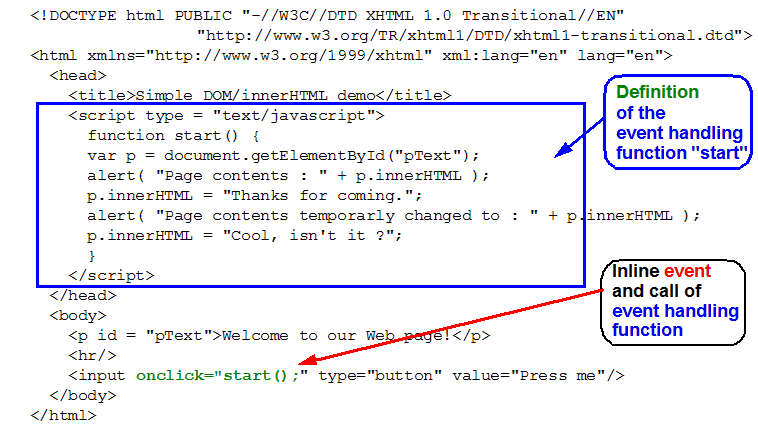
JavaScript functions can be triggered by "HTML inline" event handler definitions (old style)
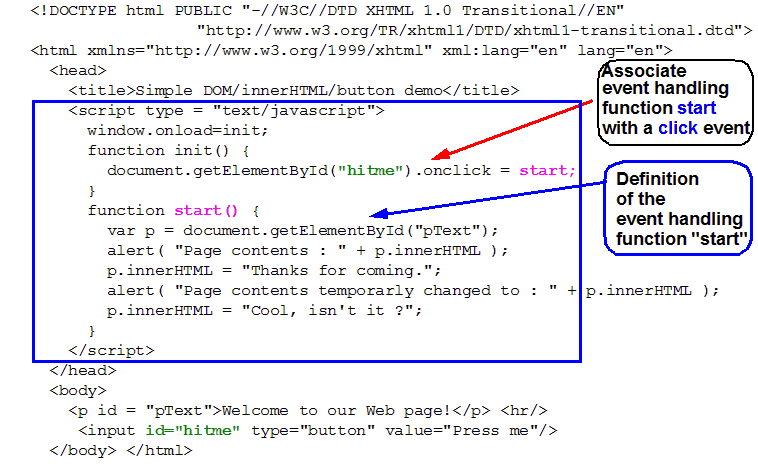
Event handling also may be defined purely within JS code (new DOM style) by assigning function names to event handling properties (new style).
... don't panic here. we will see the operational details later.
Below, we will show some examples, do not worry if you do not (yet) understand details
Note on JavaScript and true XHTML
Valid XHTML served as XHTML requires JavaScript to be inserted within a commented CDATA section. Many textbooks do not teach valid XHTML ....
<scriptlanguage="javascript">//<![CDATA[ alert ("hello I am alerting you from a valid XHTML Page"); // ]]></script>
An other, better solution is to put the javascript code into an external file.
User interface widgets
To trigger JavaScript functions one may write event handlers for many kinds of user actions. Often, JavaScript calls are executed when the page loads
The most simple way to call a JavaScript function is to use HTML forms
Examples
Below we introduce some examples that would need some extra explantions. Some "old" style techniques will not work in IE7 or IE8, which is not an issue since "old style" DOM was never really standardized. There exist Microsoft specific "old-style" techniques which we will not show here.
simple popups and buttons
A popup/DOM/onload example
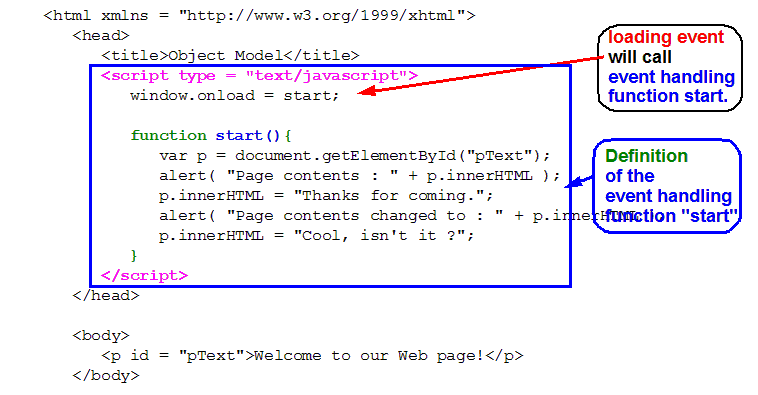
The following example shows how to trigger a JavaScript function when the page loads into the browser. Syntax:
window.onload = function_name;
In this code we do not call the function, but we give JavaScript the function name that should be called when the page loads. For newbie programmers: This is why the parenthesis are missing after function_name.
You may trigger a function at page load (like above)
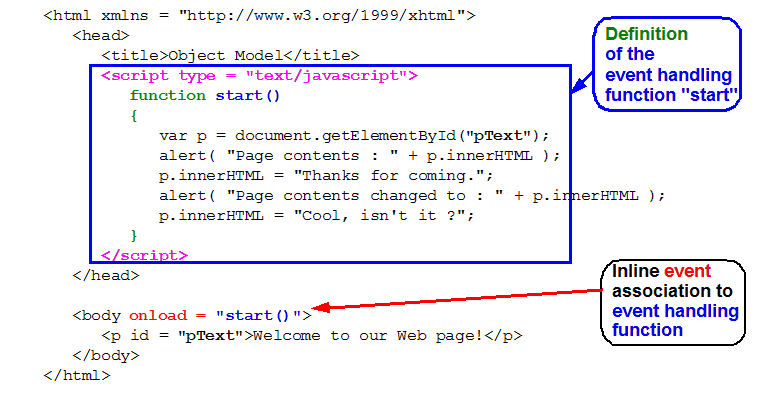
A popup/DOM/onload example - old style
Most often you will rather find old DOM 0, not as good since HTML is mixed with JS. With this method we assign a functionall to the HTML onload attribute.
<!DOCTYPE html PUBLIC "-//W3C//DTD XHTML 1.0 Transitional//EN" "http://www.w3.org/TR/xhtml1/DTD/xhtml1-transitional.dtd"><htmlxmlns="http://www.w3.org/1999/xhtml"xml:lang="en"lang="en"><head><title>SimpleDOM/innerHTMLdemo</title><scripttype ="text/javascript">functionstart(){
varp=document.getElementById("pText");
alert("Pagecontents:"+p.innerHTML);
p.innerHTML="Thanksforcoming.";
alert("Pagecontentstemporarlychangedto:"+p.innerHTML);
p.innerHTML="Cool,isn'tit?";
}
</script></head><body><pid ="pText">WelcometoourWebpage!</p><hr/><!-- When the user clicks the button, the JS "start()" function will be called --><form><inputonclick="start();"type="button"value="Press me"/></form></body></html>
Negrino & Smith (2007). JavaScript and Ajax for the Web, Visual QuickStart Guide, Sixth Edition. (You also can consult the book’s examples on its web site or download a zip file from http://www.javascriptworld.com/)